


Checking traffic tickets online in Ontario is quick, free, and an important tool for drivers to utilize thanks to the Provincial Offences Act online services.
Here’s a quick guide on how to check traffic ticket offences online.
What You Need To Check A Traffic Ticket Online
To check a traffic ticket online, you will need:
- The location code and offence number printed on your ticket or notice to look up your case.
- If you’ve received a “summons” (an order to appear before a justice of the peace), you will need the case number from the summons.
- Some portals may request your driver’s licence number or licence plate to use their online services.
If you do not have this information or if you’ve lost your ticket, contact the municipal court office in the jurisdiction where your ticket or fine was issued.
3 Steps to Check a Traffic Ticket Online in Ontario
Follow these three steps to check a traffic ticket online:
Step 1: Visit the Ontario Government Website
Go to the Provincial Offences Act online services. They will outline what you need offer a terms of agreement for you to read and approve.
Step 2: Enter Ticket Details
Use the online system to input the information found on your traffic ticket or notice. Typically, you’ll need to provide the ticket number, and sometimes just the first few characters of the ticket number.
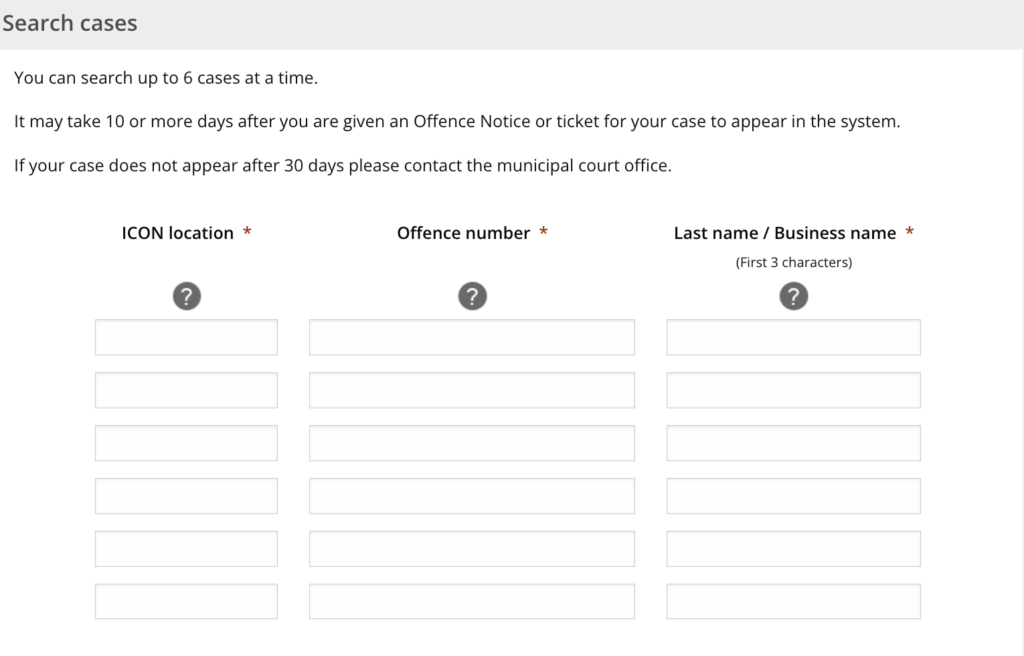
Step 3: View Case Status
The system will display information about your ticket’s status, including whether it is still outstanding and details on how to pay it or contest it.
This online system is primarily for tickets issued under the Provincial Offences Act. It may not include parking tickets or other types of violations. It can take up to 10-15 days for a ticket to appear in the system after it has been issued.
If you cannot find your ticket online, you may need to try again later or contact the specific court office listed on your ticket.
How To Pay For A Traffic Ticket Online
To pay a ticket or fine issued under the Provincial Offences Act, follow these three steps:
1. Visit the Provincial Offences Act online services online system
2. Enter the information found on your ticket or notice
3. You will be redirected to the municipal court office’s website, which will provide instructions on how to complete your payment
Missing payment deadlines can quickly escalate into larger issues, such as licence suspensions, and higher fees.
What If Your Ticket Doesn’t Show Up?
If you notice your ticket is not available, allow up to 15 days for the online systems to fully update. Take a moment to verify that you have entered the correct identifiers.
If the information still appears to be missing after this period, reach out to the court or municipal office for assistance.
Tickets You Cannot Check The Status For
You can verify the status of all tickets or fines issued under the Provincial Offences Act. However, note that you cannot check the status of the following:
- Criminal matters
- Parking tickets
- Cases that are under appeal
- Cases subject to publication bans
- Charges involving individuals under 16 years of age
Why You Should Check Your Tickets Online
Checking your tickets online helps you stay informed of the process and status of your ticket. It can also help you examine dispute options and payment deadlines. Here’s a closer look at the benefits of checking traffic tickets online:
Avoid Additional Fees And Fines
Failing to meet payment deadlines for your tickets can result in significant financial penalties, including late fees that accumulate over time. Missing these deadlines may lead to the suspension of your driver’s licence, the denial of vehicle plate renewals, or involvement with collections agencies that could impact your credit score.
Stay Informed
Utilize online portals provided by your local government or traffic enforcement agencies to keep track of your ticket status. These portals typically offer real-time updates, allowing you to see whether your tickets are unpaid, pending payment, already paid, or currently under review for any disputes you’ve filed.
Evaluate Dispute Options
If you believe you have grounds to contest a ticket you’ve received, it’s important to act quickly. You can request either a trial or an early resolution meeting with the appropriate court . This request should be made within approximately 15 days of receiving your ticket to ensure you have the best chance of resolving the issue. Be sure to gather any relevant evidence or documentation, such as a disclosure, to support your case during this process.